
 ProteoBench
LFQ, precursor ion (AIF)#
archived Quantification — DIA, Q Exactive HF-X, All-Ion Fragmentation
This module is archived
Archived because of oxidations that prevent accurate measurement of quantification accuracy — see the original GitHub discussion. Oxidized peptides produce a human-ratio distribution close to the E. coli expected ratio (see figure below). Superseded by the diaPASEF, Astral, and ZenoTOF modules; kept here for reference.
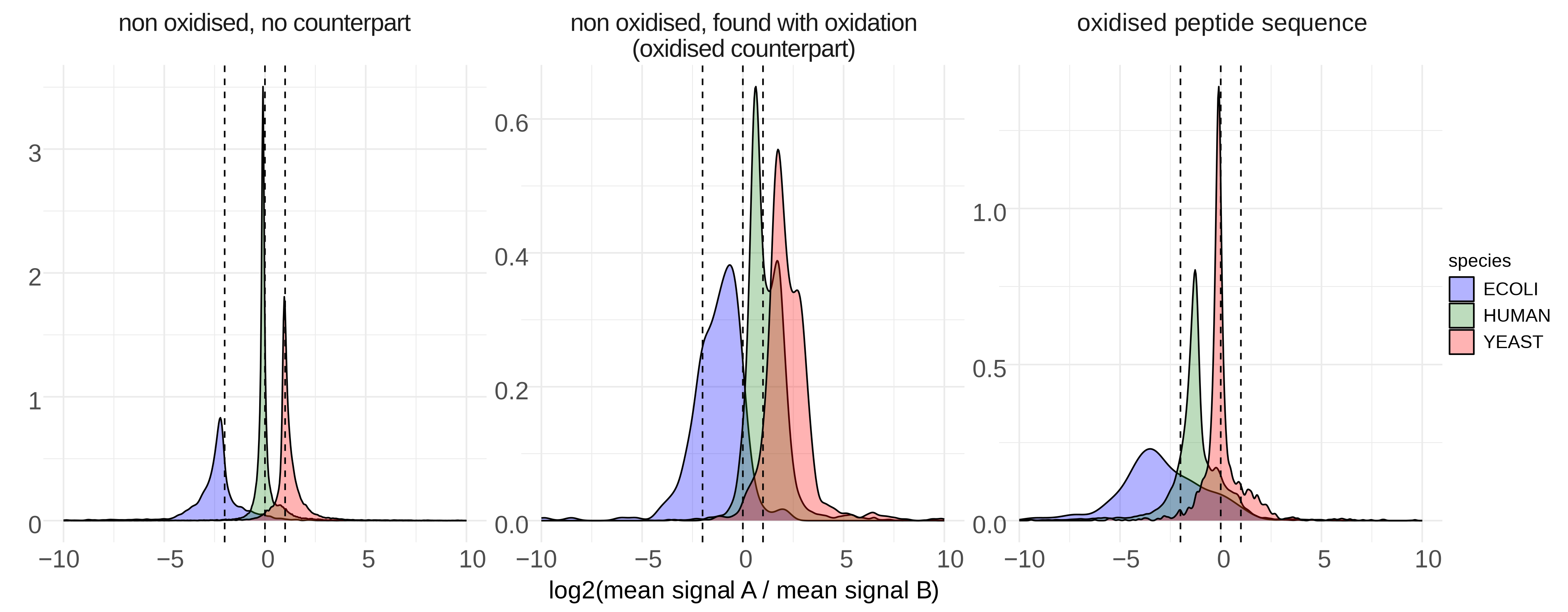
All raw files (including samples Beta and Gamma) were searched with Spectronaut v19.5.241126.62635 using a directDIA+ workflow, Trypsin/P cleavage, carbamidomethyl (C) as a fixed modification, and acetyl (protein N-term) and oxidation (M) as variable modifications (maximum 5 variable modifications). Run-wise median centering was applied after log2 transformation, then mean per sample and per condition, and the A-vs-B difference per precursor was calculated. The three panels show: precursors with ≥1 oxidation (right); precursors sharing the stripped sequence of an oxidized one (middle); and all other same-species precursors (left).
At a glance#
Acquisition |
DIA (All-Ion Fragmentation) |
Instrument |
Q Exactive HF-X Orbitrap |
Level |
Precursor ion (modified sequence + charge) |
Metric |
Epsilon (quantification accuracy) |
What this module tests#
This module compared sensitivity and quantification accuracy for DIA data acquired with All-Ion Fragmentation (AIF) on a Q Exactive HF-X. It was best suited to evaluate the impact of search engine identification, peak picking, and low-level ion signal normalization, and was not designed to evaluate later-stage post-processing (missing value replacement, manual filtering).
Dataset#
A subset of the Q Exactive HF-X AIF data described in Van Puyvelde et al., 2022: the first biological replicate series (“alpha”), three technical replicates of two conditions. Samples are commercial peptide digest standards of Escherichia coli, yeast, and human, at logarithmic fold changes (log2FC) of 0, −1, and 2 respectively.
Download:
Or from the ProteoBench server / single archive
FASTA (HYE mixed species + contaminants), contaminants from Frankenfield et al., JPR
How the metric was calculated#
For each precursor ion, ProteoBench summed the signal per raw file, removed contaminants (flagged
Cont_) and multi-species precursors, log2-transformed the remaining values, and computed the mean
and CV per condition. The difference between mean log2 intensity in A and B was compared against the
expected log2 fold change per species — that difference is epsilon.
Table: suggested parameters used for this dataset
Parameter |
Value |
|---|---|
Maximum missed cleavages |
1 |
PSM FDR |
0.01 |
Spectral library |
Predicted from FASTA |
Precursor charge state |
1–4 |
Precursor m/z range |
400–1000 |
Fragment ion m/z range |
50–2000 |
Endopeptidase |
Trypsin/P |
Fixed modifications |
Carbamidomethylation (C) |
Variable modifications |
Oxidation (M), Acetyl (Protein N-term) |
Maximum variable modifications |
1 |
Minimum peptide length |
6 residues |
Tool-specific setup (historical reference)#
Table: input files used for metric calculation and public submission
Tool |
Input file |
Parameter file |
|---|---|---|
AlphaDIA |
|
|
Custom |
|
— |
DIA-NN |
|
|
FragPipe |
|
|
FragPipe (DIA-NN quant) |
|
|
MSAID |
|
|
MaxQuant |
|
|
PEAKS |
|
|
Spectronaut |
|
|
DIA-NN
Import raw files.
Add the FASTA, but do not select “Contaminants” (already included).
Turn on FASTA digest for library-free search / library generation.
Do not set verbosity/log level above 1, or parameter parsing will fail.
Upload
*_report.tsvor*_report.parquetfor scoring andreport.log.txtfor public submission.
AlphaDIA
Select the FASTA and import
.rawfiles in “Input files”.Define search parameters in “Method settings”.
Turn on “Predict Library” and “Precursor Level LFQ”.
Because ProteoBench required both
precursors.tsvandprecursor.matrix.tsv, preprocessing via the conversion notebook was needed. The parameter file islog.txt.
FragPipe (DIA-NN quant)
Load the DIA_SpecLib_Quant workflow.
After importing raw files, assign experiments “by File Name”.
Do not add contaminants when adding decoys to the database.
Upload
*report.tsvfor scoring andfragpipe.workflowfor public submission.
FragPipe reports protein identifiers across two columns (“Proteins” and “Mapped Proteins”); these are concatenated to form the protein groups.
Spectronaut
Accepted format: BGS Factory Report — ..._Report.tsv for scoring,
..._Report.setup.txt for parameter parsing.
Import the module FASTA in “Databases” (UniProt parsing rule).
In “Analysis”, select “Set up a DirectDIA Analysis from file” and load the raw files.
Import the FASTA on the next tab and select it.
Choose search settings.
Assign conditions: “A” for the three
Condition_A_Sample_Alphareplicates, “B” for the threeCondition_B_Sample_Alphareplicates.Skip GO terms/library extensions.
Run the search, then export a BGS Factory Report as
..._Report.tsv.Upload
..._Report.tsvprivately and..._Report.setup.txtfor public submission.
MaxDIA (work in progress)
By default MaxDIA uses its own contaminants-only FASTA. This module’s FASTA already includes a
curated contaminant set, so untick “Include contaminants” (Global parameters → Sequences), and
set FASTA parsing to Identifier rule = >([^\t]*), Description rule = >(.*). Use “No Fractions”
and name experiments A_Sample_Alpha_01…A_Sample_Alpha_03, B_Sample_Alpha_01…B_Sample_Alpha_03.
Upload evidence.txt for scoring and mqpar.xml for public submission.
PEAKS
Rename samples to match the raw file names exactly (LFQ_Orbitrap_AIF_Condition_A_Sample_Alpha_01
… _03, and the equivalent for condition B).
ProteoBench automatically corrects small naming differences (case, spacing, minor typos) in PEAKS sample names, but anything it can’t confidently resolve will still fail with a message telling you which name(s) didn’t match. Exact names are still the safest bet.
Set Enzyme = trypsin, Instrument = Orbitrap (Orbi-Orbi), Fragment = HCD, Acquisition = DIA. In the workflow, use the Quantification option; define search parameters in “DB search”. In “Quantification” use “Label Free” (individually or grouped by condition); in “Report” set both Peptide and Precursor FDR to 1%. Check “All Search Parameters” and the “Feature Vector CSV” (Export tab) once finished.
Troubleshooting: since the Thermo DIA .raw files used a staggered-window acquisition, convert
and demultiplex to .mzML with MSConvert first — see
FragPipe’s conversion tutorial.
Custom format
The custom tab-delimited format used the following columns:
Sequence— unmodified peptide sequenceProteins—;-separated identifiers, including the species flag (e.g._YEAST)Charge— precursor chargeModified sequence— sequence with localized modifications, in ProFormaone quantitative column per sample:
LFQ_Orbitrap_AIF_Condition_A_Sample_Alpha_01…LFQ_Orbitrap_AIF_Condition_B_Sample_Alpha_03
The table was not to contain non-validated ions.
Result columns#
The results table included: the precursor ion (modified sequence + charge); mean and standard deviation of log2-transformed and of raw intensity per condition; CV per condition; the difference of mean log2 values between conditions; per-raw-file intensity; the number of raw files with a non-missing value; species and whether the sequence is species-specific; the expected ratio for that species; and epsilon.
Parameters tracked for public submission#
ProteoBench tracked: software tool name and version; search engine name and version (if different); FDR threshold (PSM, peptide, protein level); match-between-runs; precursor and fragment m/z range and mass tolerance; enzyme and maximum missed cleavages; minimum/maximum peptide length; fixed and variable modifications and their maximum count; and minimum/maximum precursor charge.
Contact us or open an issue with any problems.